「Chromebookの隠しモード『crosh(クロッシュ)』を使いこなしていますか?」
Linuxのようにコマンドが打てるcroshですが、英語のヘルプ画面を見ただけでは「どのコマンドが何に効くのか」分かりにくいですよね。
実は、バッテリーの寿命を調べたり、ネットワークの不調を診断したりと、サラリーマンの私たちが日常で使える便利なコマンドがいくつもあります。今回は、croshの全コマンド一覧を日本語で分かりやすく整理しました。目的別にまとめたので、ぜひ辞書代わりに使ってください!
- Chromebookの「crosh」を起動する方法
- 【厳選】これだけは知っておきたい!便利コマンドTOP 5
- 目的別croshコマンドリファレンス
- crosh画面のカスタマイズ方法
- 参考:Chrome OS croshのコマンド一覧
- arc
- autest
- battery_firmware
- battery_test
- bt_console
- ccd_pass
- chaps_debug
- connectivity
- cras
- diag
- display_debug
- dlc_install
- dlc_list
- dmesg
- enroll_status
- evtest
- exit
- ff_debug
- force_activate_fips
- free
- generate_firmware_dump
- gesture_prop
- help
- help_advanced
- ipaddrs
- meminfo
- memory_test
- modem
- p2p_update
- packet_capture
- ping
- printscan_debug
- rlz
- rollback
- route
- set_arpgw
- set_time
- set_wake_on_lan
- storage_test_1
- storage_test_2
- swap
- sync
- syslog
- time_info
- top
- tracepath
- u2f_flags
- uname
- upload_crashes
- upload_devcoredumps
- uptime
- verify_ro
- vmc
- vmstat
- vsh
- wifi_power_save
- wireguard
Chromebookの「crosh」を起動する方法
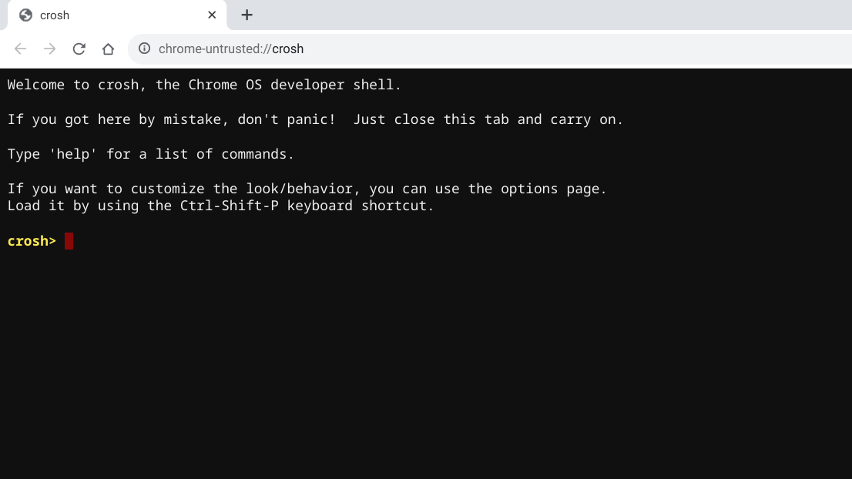
まずは基本の起動方法です。
- ショートカットキー:
Ctrl+Alt+t - ブラウザから起動: アドレスバーに
chrome-untrusted://crosh/と入力
画面が立ち上がったら、以下のようにコマンドを入力して実行します。
【厳選】これだけは知っておきたい!便利コマンドTOP 5
全コマンドを見る前に、特によく使うものをピックアップしました。
- top:どのアプリが動作を重くしているか確認(「q」キーを押しモードから抜けます)
- free:メモリの使用状況をチェック
- ipaddrs:IPアドレスを確認できます。
- ping:ネットワークの疎通確認ができます。
- battery_test:バッテリーの劣化具合を確認(
battery_test 10で10秒テスト)
目的別croshコマンドリファレンス
ここでは、全コマンドを目的別に分類しました。
1. システム・バッテリー・ログの状態を調べる
- dmesg:システム(カーネル)の動作ログを表示します。デバイスの接続トラブルやエラーの原因を調べる際に非常に強力なコマンドです。
- free / meminfo:メモリの使用状況や空き容量を詳しく表示します。
- uptime:システムが起動してから現在までの時間を表示します。
- top:現在、どのプロセスがCPUやメモリを消費しているかリアルタイムで確認します。
- battery_test [秒数]:バッテリーの健康状態をテストします。
2. ネットワークのトラブルを解決する
- ping [-4] [-6] [ホスト名]:特定のサイトに通信が届いているか確認。
- ipaddrs:自分のChromebookのIPアドレスを一覧表示します。
- tracepath [ホスト名]:通信経路のどこで遅延が起きているか調査。
3. 高度な設定・デバッグ(上級者向け)
- arc [ping | dns | proxy]:Androidアプリ実行環境(ARC)のネットワーク診断。
- vmc / vsh:仮想マシン(Linux環境など)の管理やシェル起動。
- bt_console:Bluetoothのデバッグコンソールを起動。
- cras:オーディオサーバー(音関連)の設定。
crosh画面のカスタマイズ方法
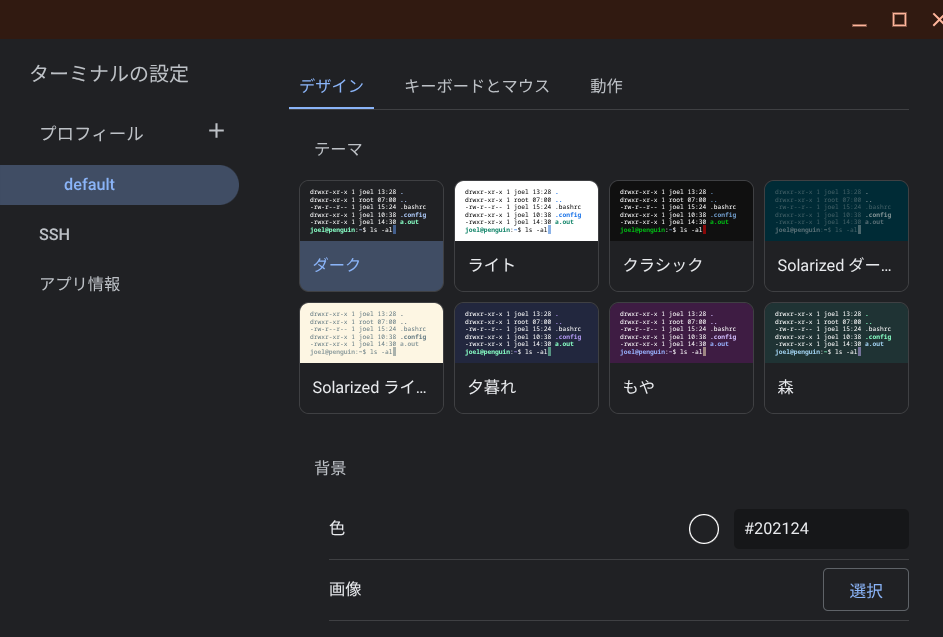
黒い画面を自分好みに変えられます。 crosh画面上で Shift + Ctrl + P を押すと設定画面が開き、文字の色、背景、フォントなどを自由に変更できます。
参考:Chrome OS croshのコマンド一覧
Google Chrome OS バージョン: バージョン 143.0.7499.150(公式ビルド) (64 ビット)のコマンド一覧情報です。
arc
Usage: arc
  [ ping [ NETWORK ] [ <ip address> | <hostname> ] |
    http [ NETWORK ] <url> |
    dns [ NETWORK ] <domain> |
    proxy <url> |
    list [ networks ] |
    stats [ sockets | traffic | idle ]
    tracing [on | off] |
    top |
    cpuinfo |
    meminfo
  ]
  where NETWORK := [ wifi | eth | ethernet | cell | cellular | vpn ]
  If NETWORK is not specified, the default network is used.

ping:           check the reachability of a host or IP address.
http:           do a GET request to an URL and print the response header.
dns:            perform a DNS lookup of a domain name.
proxy:          resolve the current proxy configuration for a given URL.
list networks:  show properties of all networks connected in Android.
stats sockets:  show TCP connect and DNS statistics by Android Apps.
stats traffic:  show traffic packet statistics by Android Apps.
stats idle   :  show system idle stats of Android.
tracing      :  enable or disable tracing ARCVM from the host.
top:            show resource information snapshot on Android.
cpuinfo:        show CPU usage on Android.
meminfo:        show memory usage on Android.
autest
autest [--scheduled]
  Trigger an auto-update against a **test** update server.

  WARNING: This may update to an untested version of ChromeOS which was never
  intended for end users!

  The --scheduled option fakes a scheduled update.
battery_firmware
battery_firmware <info>
  info   : Query battery info.
battery_test
battery_test [<test length>]
  Tests battery discharge rate for given number of seconds. Without an argument,
  defaults to 300 seconds.
bt_console
bt_console
  Enters a Bluetooth debugging console.
ccd_pass
ccd_pass
  When prompted, set or clear CCD password (use the word 'clear' to clear
  the password).
chaps_debug
chaps_debug [start|stop|<log_level>]
  Sets the chapsd logging level.  No arguments will start verbose logging.
connectivity
connectivity
  Shows connectivity status.  'connectivity help' for more details
cras
cras [ enable <flag> | disable <flag> | telephony <event> [arg] ]
  Interact with CRAS(CrOS Audio Server) to set flags or trigger events.

  Subcommands:
    enable/disable <flag>:
      Enable or disable feature flag inside CRAS.
      Available flags:
      - wbs: Turn on this flag to make CRAS try to use wideband speech mode in
        Bluetooth HFP, if both the Bluetooth controller and peripheral supports
        this feature.
      - noise_cancellation: Turn on this flag to enable noise cancellation
        processing to input devices who support noise cancellation.

      Notice: The flag changes made through this command do not persist after
      reboot.

    telephony <event> [args...]:
      Trigger a telephony event pass to CRAS in Bluetooth HFP.

      Available events:
      - IncomingCall <PhoneNumber>: Make a call from external line.
          Ex: $ cras telephony IncomingCall 12345678
      - AnswerCall: Answer the call.
      - TerminateCall: Terminate the call.
      - SetDialNumber [DailNumber]: Set the last dialed number recorded. Clear
        the recorded number if no DailNumber is provided.
      - SetBatteryLevel <BatteryLevel>: Set and transfer the battery level to
        HF. The BatteryLevel should range from 0 to 5.
      - SetSignalStrength <SignalStrength>: Set and transfer the signal strength
        to HF. The SignalStrength should range from 0 to 5.
      - SetServiceAvailability <0/1>: Set if the service is available or not.
      - SetCallheld <CallHeldIndicator>: Set the callheld indicator.
        CallHeldIndicator:
          0 = No calls held
          1 = Call is placed on hold or active/held calls swapped
          (The AG has both an active AND a held call)
          2 = Call on hold, no active call
      - SetCallsetup <CallSetupIndicator>: Set the callsetup indicator.
        CallSetupIndicator:
          0 = No call setup in progress
          1 = Incoming call setup in progress
          2 = Outgoing call setup in dialing state
          3 = Outgoing call setup in alerting state
      - SetCall <CallIndicator>: Set the call indicator.
        CallIndicator:
          0 = No call (held or active)
          1 = Call is present (active or held)
diag
diag
Usage: [list|routine]
display_debug
display_debug
  A tool to assist with collecting logs when reproducing display related issues.

  Subcommands:
    trace_start Usage: display_debug trace_start
      Increase size and verbosity of logging through drm_trace.

    trace_stop Usage: display_debug trace_stop
      Reset size and verbosity of logging through drm_trace to defaults.

    trace_annotate Usage: display_debug trace_annotate <message>
      Append |message| to the drm_trace log.

    diagnose Usage: display_debug diagnose
      Give a sequence of steps to assist in debugging display issues.
dlc_install
dlc_install <dlc-id>|--audio
  Trigger a DLC installation against a **test** update server.

The **test** update server will serve signed DLC payloads which will only
successfully install if signed and verifiable. Otherwise, installations will
fail. The magical string 'autest' is passed into update_engine during this
installation, which will make requests against QA Omaha server and not the
production Omaha server.

WARNING: This may install an untested version of the DLC which was never
intended for end users!
dlc_list
dlc_list
  List the supported DLC(s)
dmesg
Usage: dmesg [options]
        -d, --show_delta
                Display the timestamp and the time delta
            spent between messages
        -H, --human
                Enable human-readable output.
        -k, --kernel
                Print kernel messages.
        -L, --color
                Colorize the output.
        -p, --force-prefix
                Add facility, level or timestamp
            information to each line of a multi-line message.
        -r, --raw
                Print the raw message buffer.
        -T, --ctime
                Print human-readable timestamps.
        -t, --notime
                Do not print kernel's timestamps.
        -u, --userspace
                Print userspace messages.
        -x, --decode
                Decode facility and level (priority) numbers
            to human-readable prefixes.
enroll_status
enroll_status [--mode] [--domain] [--realm] [--user]
  Displays device enrollment information.
evtest
evtest
  Run evtest in safe mode.
exit
exit
  Exit crosh.
ff_debug
ff_debug
Usage: ff_debug [<tag_expression>] [--level <level>] [--persist]
       ff_debug --help
       ff_debug --reset
       ff_debug --list_valid_tags

  ff_debug adds and removes debug tags for flimflam.
  Current debug settings are displayed if no parameters are provided

  <tag_expression> is defined in boolean notation using <debug_tag> separated
    by an operator [+-], where + and - imply adding and removing of the tag immediately
    following the operator. An expression beginning with either operators [+-]
    takes the existing tags and modifies them appropriately.  Otherwise, the existing tags
    are replaced by those specified in the command.

    <debug_tag> can be listed using the --list_valid_tags

    e.g.: ff_debug network+wifi
      Sets debug tags to network and wifi
    e.g.: ff_debug +network-service
      Adds network and removes service tags from the existing debug settings

  --list_valid_tags : Displays all valid tags

  --level : Displays or sets current debug level for logging
    All messages at, or above, the current log level are logged. Normal log
    levels range from 4 (LOG_FATAL) to 0 (LOG_INFO). In addition VERBOSE log
    levels are available starting at -1.

    e.g.: ff_debug --level 4
      Logs only FATAL messages.
    e.g.: ff_debug --level 0
      Logs INFO, WARNING, ERROR, ERROR_REPORT, and FATAL messages.
    e.g.: ff_debug --level -4
      Logs everything that "--level 0" does, plus SLOG(<tag>, <n>) messages,
      where <tag> has been enabled for logging, and <n> <= 4. (NOTE: you must
      negate SLOG levels for use with ff_debug. In this example, SLOG(<tag>, 4)
      maps to "--level -4".)

  --reset : Removes all tagging and persistent debug configuration (if any) and
    restores default log level

  --persist : Stores the current debug configuration so that it is
    reused after restart.

  --help : Displays this output
force_activate_fips
force_activate_fips
  Force activate FIPS mode for the built-in security key.
free
Linuxのコマンドでもあるメモリの使用量をみるコマンドですね。
crosh> free
total used free shared buff/cache available
Mem: 8003216 4934180 285600 2305200 2783436 265680
Swap: 11723460 6366168 5357292
free [options]
Display free/used memory info.generate_firmware_dump
generate_firmware_dump <all|wifi>
  Generate firmware dump for the given type.
gesture_prop
gesture_prop [ devices | list <device ID> | get <device ID> <property name> | set <device ID> <property name> <value> ]
  Read and change gesture properties for attached input devices. The "Enable
  gesture properties D-Bus service" flag must be enabled for this command to
  work.

  For more details, see:
  https://chromium.googlesource.com/chromiumos/platform/gestures/+/HEAD/docs/gesture_properties.md

  Subcommands:
    devices, devs:
      List the devices managed by the gestures library, with their numeric IDs.

    list <device ID>:
      List the properties for the device with the given ID.

    get <device ID> <property name>:
      Get the current value of a property. Property names containing spaces
      should be quoted. For example:
      $ gesture_prop get 12 "Mouse CPI"

    set <device ID> <property name> <value>:
      Set the value of a property. Values use the same syntax as dbus-send
      (https://dbus.freedesktop.org/doc/dbus-send.1.html#description), and
      should either be arrays or strings. For example:
      $ gesture_prop set 12 "Mouse CPI" array:double:500
      $ gesture_prop set 12 "Log Path" string:/tmp/foo.txt
help
help [command]
  Display general help, or details for a specific command.
help_advanced
help_advanced
  Display the help for more advanced commands, mainly used for debugging.
ipaddrs
パソコンのIPアドレスが確認できるコマンド。
crosh> ipaddrs -4
/0 [ ip -4 addr show ]
/1 1: lo: mtu 65536 qdisc noqueue state UNKNOWN group default qlen 1000
/2 inet 127.0.0.1/8 scope host lo
/3 valid_lft forever preferred_lft forever
/4 2: wlan0: mtu 1500 qdisc noqueue state UP group default qlen 1000
/5 inet 192.168.116.82/24 brd 192.168.116.255 scope global wlan0
/6 valid_lft forever preferred_lft forever
/7 3: arc_ns0@if2: mtu 1500 qdisc noqueue state UP group default qlen 1000 link-netnsid 0
/8 inet 100.115.92.129/30 brd 100.115.92.131 scope global arc_ns0
/9 valid_lft forever preferred_lft forever
ipaddrs [-4] [-6]
Display IP addresses.
-4: Only show IPv4 addresses.
-6: Only show IPv6 addresses.meminfo
メモリ状態の詳細を確認できるコマンド。
crosh> meminfo
MemTotal: 8003216 kB
MemFree: 386496 kB
MemAvailable: 304112 kB
Buffers: 5136 kB
Cached: 2148832 kB
SwapCached: 2084 kB
Active: 1678832 kB
meminfo
Display detailed memory statistics.memory_test
memory_test
  Performs extensive memory testing on the available free memory.
modem
modem <command> [args...]
  Interact with the 3G modem. Run "modem help" for detailed help.
p2p_update
p2p_update [enable|disable] [--num-connections] [--show-peers]
  Enables or disables the peer-to-peer (P2P) sharing of updates over the local
  network. This will both attempt to get updates from other peers in the
  network and share the downloaded updates with them. Run this command without
  arguments to see the current state.  Additional switches will display number
  of connections and P2P peers.
packet_capture
Usage: packet_capture [options]
        --device        <device>
        --max-size      <max size in MiB>
        --frequency     <frequency>
        --ht-location   <above|below>
        --vht-width     <80|160>
        --monitor-connection-on         <monitored_device>

Start packet capture.  Start a device-based capture on <device>,
  or do an over-the-air capture on <frequency> with an optionally
  provided HT channel location or VHT channel width.  An over-the-air
  capture can also be initiated using the channel parameters of a
  currently connected <monitored_device>.  Note that over-the-air
  captures are not available with all 802.11 devices. Set <max_size>
  to stop the packet capture if the output .pcap file size exceedes this
  limit. Only device-based capture options (--device and --max-size) are
  available in verified mode. Switch to developer mode to use other
  options.
ping
ping [-4] [-6] [-c count] [-i interval] [-n] [-s packetsize] [-W waittime] <destination>
  Send ICMP ECHO_REQUEST packets to a network host.  If <destination> is "gw"
  then the next hop gateway for the default route is used.
  Default is to use IPv4 [-4] rather than IPv6 [-6] addresses.

  https://en.wikipedia.org/wiki/Ping_(networking_utility)
printscan_debug
printscan_debug
  A tool to assist with collecting logs when reproducing printing and scanning related issues.

  Subcommands:
    start Usage: printscan_debug start [all|scanning|printing]
      Start collecting printscan debug logs.

    stop Usage: printscan_debug stop
      Stop collecting printscan debug logs.
rlz
rlz < status | enable | disable >
  Enable or disable RLZ.  See this site for details:
  http://dev.chromium.org/developers/design-documents/extensions/proposed-changes/apis-under-development/rlz-api
rollback
rollback

  Attempt to rollback to the previous update cached on your system. Only
  available on non-stable channels and non-enterprise enrolled devices.

  Please note that this will powerwash your device.
route
routeテーブルを確認するコマンド。
crosh> route -4
/0

/24 [ ip -4 route show table 1002 ]
/25 default via 192.168.116.254 dev wlan0 metric 10
route [-4] [-6] [--all]
Display the network routing tables.
https://en.wikipedia.org/wiki/Routing_table
-4: Only show IPv4 routes.
-6: Only show IPv6 routes.
--all: Show all routing tables.set_arpgw
set_arpgw <true | false>
  Turn on extra network state checking to make sure the default gateway
  is reachable.

  https://en.wikipedia.org/wiki/Default_gateway
set_time
set_time <time string>
  Sets the system time if the the system has been unable to get it from the
  network.  The time may be initialized only once per-boot.

  The <time string> uses the format of the GNU coreutils date command.
  https://www.gnu.org/software/coreutils/manual/html_node/Date-input-formats.html
  https://www.gnu.org/software/coreutils/faq/coreutils-faq.html#The-date-command-is-not-working-right_002e

  Please see the timekeeping documentation for more information in general:
  https://www.chromium.org/chromium-os/chromiumos-design-docs/timekeeping/
set_wake_on_lan
set_wake_on_lan <true | false>
  Enable or disable Wake on LAN for Ethernet devices.  This command takes
  effect after re-connecting to Ethernet and is not persistent across system
  restarts.
storage_test_1
storage_test_1
  Performs a short offline SMART test.
storage_test_2
storage_test_2
  Performs an extensive readability test.
swap
swap状態を見たりするコマンド。
crosh> swap status
Filename Type Size Used Priority
/dev/zram0 partition 11723460 6655940 -2
low-memory margin (MiB): 406 3126
min_filelist_kbytes (KiB): 0
ram_vs_swap_weight: 4
extra_free_kbytes (KiB): 0
swap [ enable <size (MB)> | disable | start | stop | status ]
Change kernel memory manager parameters
(FOR EXPERIMENTS ONLY --- USE AT OWN RISK)
"swap status" (also "swap" with no arguments) shows the values of various
memory manager parameters and related statistics.
The enable/disable options enable or disable compressed swap (zram)
persistently across reboots, and take effect at the next boot. The enable
option takes the size of the swap area (in megabytes before compression).
If the size is omitted, the factory default is chosen.
The start/stop options turn swap on/off immediately, but leave the settings
alone, so that the original behavior is restored at the next boot.
WARNING: if swap is in use, turning it off can cause the system to
temporarily hang while the kernel frees up memory. This can take
a long time to finish.sync
sync
  Synchronize cached writes to persistent storage.
syslog
syslog <message>
  Logs a message to syslog (the system log daemon).

  This can help mark/flag/label the logs just before & after running a different
  operation so you can locate the relevant errors faster.
time_info
time_info
  Returns the current synchronization state for the time service.
top
プロセスの状態、PIDをリアルタイム確認するコマンド。
crosh> swap status
top - 14:12:56 up 5:21, 0 users, load average: 0.65, 0.84, 0.92
Tasks: 432 total, 1 running, 431 sleeping, 0 stopped, 0 zombie
%Cpu(s): 11.1 us, 3.4 sy, 0.0 ni, 85.4 id, 0.1 wa, 0.0 hi, 0.1 si, 0.0 st
MiB Mem : 7815.6 total, 442.3 free, 5140.7 used, 2232.6 buff/cache
MiB Swap: 11448.7 total, 4881.4 free, 6567.3 used. 412.1 avail Mem

PID USER PR NI VIRT RES SHR S %CPU %MEM TIME+ COMMAND
3118 chronos 20 0 24.4g 118044 68816 S 21.8 1.5 0:31.29 chrome
1916 chronos 12 -8 18.2g 124384 21504 S 13.2 1.6 31:04.14 chrome
1825 chronos 12 -8 17.0g 285248 116380 S 10.2 3.6 20:30.30 chrome
top
Run top. This will tell you what resources are currently being used and low
level system processes.
Users should use the Chrome Task Monitor: press Search+Escape to open it.tracepath
tracepath [-4] [-6] [-n] <destination>[/port]
  Trace the path/route to a network host.
  Default is to trace IPv4 [-4] rather than IPv6 [-6] targets.

  https://en.wikipedia.org/wiki/Traceroute
u2f_flags
u2f_flags <u2f | g2f>[, enable_global_key, verbose]
  Set flags to override the second-factor authentication daemon configuration.
  u2f: Always enable the standard U2F mode even if not set in device policy.
  g2f: Always enable the U2F mode plus some additional extensions.
  enable_global_key: Make the power button security key "global" - can be used outside a
                     logged-in session for the google.com relying party.
  verbose: Increase the daemon logging verbosity in /var/log/messages.
uname
Linuxにもあるunameコマンド。
crosh> uname -a
Linux localhost 6.1.145-17510-g2f3369c91536 #1 SMP PREEMPT_DYNAMIC Tue, 14 Oct 2025 01:54:28 -0700 x86_64 Intel(R) Pentium(R) Silver N6000 @ 1.10GHz GenuineIntel GNU/Linux
uname [options]
Display system info.upload_crashes
upload_crashes
  Uploads available crash reports to the crash server.

  Check chrome://crashes for processed crashes.
upload_devcoredumps
upload_devcoredumps <enable|disable>
  Enable or disable the upload of devcoredump reports.
uptime
Chrome OSの起動時間(起動していた時間)を確認するコマンド。
crosh> uptime
14:16:46 up 5:24, 0 users, load average: 0.88, 0.87, 0.91
uptime
Display uptime/load info.
https://en.wikipedia.org/wiki/Uptime
https://en.wikipedia.org/wiki/Load_(computing)verify_ro
verify_ro
  Verify AP and EC RO firmware on a ChromeOS device connected over SuzyQ
  cable, if supported by the device.
vmc
USAGE: vmc [
     start [--enable-gpu] [--enable-dgpu-passthrough] [--enable-big-gl] [--enable-virtgpu-native-context] [--vtpm-proxy] [--enable-audio-capture] [--extra-disk PATH] [--dlc ID] [--tools-dlc ID] [--kernel PATH] [--initrd PATH] [--rootfs PATH] [--vm-type <CROSTINI | ARC_VM | BOREALIS | BRUSCHETTA | BAGUETTE>] [--no-start-lxd] [--writable-rootfs] [--kernel-param PARAM]... [--oem-string STRING]... [--bios PATH] [--pflash PATH] [--bios-dlc ID] [--timeout PARAM] [--no-shell] [--user NAME] [--user-uid PARAM] [--user-group PARAM]... <vm name>
  |  stop <vm name>
  |  launch <main descriptor> [<descriptor>...]
  |  create [-p] [--size SIZE] --vm-type <vm type> <vm name> [<source media> [<removable storage name>]] [-- additional parameters]
  |  create-extra-disk --size SIZE <file name> [<removable storage name>]
  |  adjust <vm name> <operation> [additional parameters]
  |  destroy [-y] <vm name>
  |  disk-op-status <command UUID>
  |  export [-d] [-f] <vm name> <file name> [<removable storage name>]
  |  import [--vm-type <vm type>] <vm name> <file name> [<removable storage name>]
  |  inspect-backup <file name> [<removable storage name>]
  |  resize <vm name> <size>
  |  list
  |  logs <vm name>
  |  share <vm name> <path>
  |  unshare <vm name> <path>
  |  container <vm name> <container name> [ (<image server> <image alias>) | (<rootfs path> <metadata path>) ] [--privileged <true/false>] [--timeout PARAM]
  |  update-container-devices <vm name> <container name> (<vm device>:<enable/disable>)...
  |  usb-attach <vm name> <bus>:<device> [<container name>]
  |  usb-detach <vm name> <port>
  |  usb-list <vm name>
  |  key-attach <vm name> <hidraw path>
  |  pvm.send-problem-report [-n <vm name>] [-e <reporter's email>] <description of the problem>
  |  --help | -h
]
vmstat
Linuxにもあるパフォーマンス(CPUやメモリといったリソース使用状況)を確認するコマンド。
crosh> vmstat 1 4
procs -----------memory---------- ---swap-- -----io---- -system-- ------cpu-----
r b swpd free buff cache si so bi bo in cs us sy id wa st
1 0 6814412 659984 16300 2325904 152 299 155 157 163 255 17 5 77 0 0
0 0 6814412 658112 16300 2327020 4 0 0 0 1631 2637 4 3 93 0 0
0 0 6814412 657692 16300 2327020 0 0 4 0 1334 2315 4 2 94 0 0
2 0 6814412 660128 16308 2326064 8 0 0 252 1409 2653 5 2 92 0 0
vmstat [options]
  Report virtual memory statistics.
vsh
vsh <vm_name> [<container_name>]
  Connect to a shell inside the VM <vm_name>, or to a shell inside the container
  <container_name> within the VM <vm_name>.
wifi_power_save
wifi_power_save < status | enable | disable >
  Enable or disable WiFi power save mode.  This command is not persistent across
  system restarts.
wireguard
wireguard <cmd> [<args>]

Available subcommands:

list
    Show all configured WireGuard services.
show <name>
    Show the WireGuard service with name <name>.
new <name>
    Create a new WireGuard service with name <name>.
del <name>
    Delete the configured WireGuard service with name <name>.
set <name> [local-ip <ip1>[,<ip2>]] [private-key] [mtu <mtu>] [dns <ip1>[,<ip2>]...]
           [peer <base64-public-key> [remove]
                                     [endpoint <hostname>/<ip>:<port>]
                                     [preshared-key]
                                     [allowed-ips <ip1>/<cidr1>[,<ip2>/<cidr2>]...]
                                     [persistent-keepalive <interval seconds>] ]...
    Configure properties for the WireGuard service with name <name>. Most options should
    have the same meaning and usage as in `wireguard-tools` (and `wg-quick`). Exceptions
    are:
    - At most one IPv4 address and one IPv6 address is supported for `local-ip`.
    - If `dns` is not set, it will be defaulted to "8.8.8.8,8.8.4.4".
    - If `mtu` is not set, it will be determined automatically. Set it to 0 to reset the
      existing value.
    - `endpoint` must be set before using `connect` command.
    - `private-key` and `preshared-key` take no parameters. If they are used, this command
      will prompt you to change the key (or remove the key) via stdin, to avoid leaving
      them in the history of shell.
    Note: If there is no IPv6 configuration (in ip, dns, or allowed-ips), IPv6 will be
    blocked if the shortest prefix length in allowed-ips is less than 8.
connect <name>
    Connect to the configured WireGuard service with name <name>.
disconnect <name>
    Disconnect from the configured WireGuard service with name <name>.

  Utility to configure and control a WireGuard VPN service
コメント